Impulses can be deployed as a C++ library. This packages all your signal processing blocks, configuration and learning blocks up into a single package. You can include this package in your own application to run the impulse locally. In this tutorial you’ll export an impulse, and build an application for Sony’s Spresense development board to classify sensor data.
Knowledge requiredThis tutorial assumes that you’re familiar with building applications for Sony’s Spresense. If you’re unfamiliar with either of these you build binaries directly for your development board from the Deployment page in the studio.
Prerequisites
Make sure you’ve followed one of the tutorials and have a trained impulse. Also install the following software:
Cloning the base repository
We created an example repository which contains a small application for Sony’s Spresense, which takes the raw features as an argument, and prints out the final classification. Download the application here, or import this repository using Git:
$ git clone https://github.com/edgeimpulse/example-standalone-inferencing-spresense
Deploying your impulse
Head over to your Edge Impulse project, and go to the Deployment tab. From here you can create the full library which contains the impulse and all required libraries. Select C++ library and click Build to create the library.
Download the .zip file and extract the directories in the example-standalone-inferencing-spresense/edge_impulse/ folder. Your final folder structure should look like this:
example-standalone-inferencing-spresense/
|_ edge_impulse/
|  |_ edge-impulse-sdk/
|  |_ model-parameters/
|  |_ tflite-model/
|  |_ README.md
|_ mkspk/
|_ spresense-exported-sdk/
|_ stdlib/
|_ tools/
|_ .gitignore
|_ Dockerfile
|_ LICENSE
|_ Makefile
|_ README.md
|_ ei_main.cpp
|_ main.cpp
Running the impulse
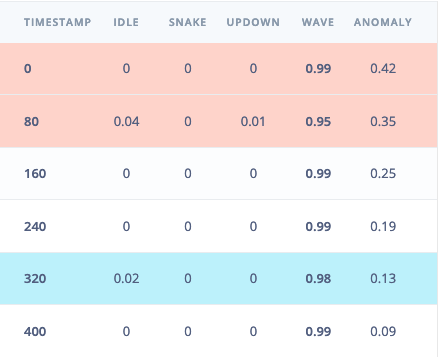
With the project ready it’s time to verify that the application works. Head back to the studio and click on Live classification. Then load a validation sample, and click on a row under ‘Detailed result’.
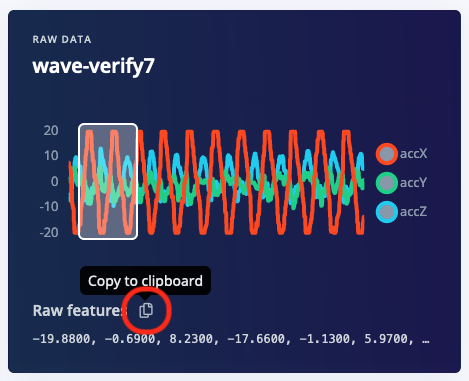
To verify that the local application classifies the same, we need the raw features for this timestamp. To do so click on the Copy to clipboard button next to ‘Raw features’. This will copy the raw values from this validation file, before any signal processing or inferencing happened.
Open ei_main.cpp and paste the raw features inside the static const float features[] definition, for example:
static const float features[] = {
    -19.8800, -0.6900, 8.2300, -17.6600, -1.1300, 5.9700, ...
};
Building the application (make)
-
Build the application by calling make in the root directory of the project:
-
Connect the board to your computer using USB.
-
Flash the board:
Building the application (Docker)
-
Build the Docker image:
$ docker build -t spresense-build .
-
Build the application by running the container as follows:
Windows
$ docker run --rm -it -v "%cd%":/app spresense-build /bin/bash -c "make -j"
$ docker run --rm -it -v $PWD:/app:delegated spresense-build /bin/bash -c "make -j"
-
Connect the board to your computer using USB.
-
Flash the board:
Or if you don’t have
make installed:
$ tools/flash_writer.py -s -d -b 115200 -n build/firmware.spk
Seeing the output
To see the output of the impulse, connect to the development board over a serial port on baud rate 115200 and reset the board. You can do this with your favourite serial monitor or with the Edge Impulse CLI:
$ edge-impulse-run-impulse --raw
Edge Impulse standalone inferencing (Sony Spresense)
Running neural network...
Predictions (time: 8 ms.):
idle:   0.015319
snake:  0.000444
updown: 0.006182
wave:   0.978056
Anomaly score (time: 0 ms.): 0.133557
run_classifier_returned: 0
[0.01532, 0.00044, 0.00618, 0.97806, 0.134]