
Linux, Ubuntu, MacOS, and Raspbian OS
- Create an Edge Impulse account.
- Install Python 3 on your host computer.
-
Install Node.js v16.x+ or above on your host computer.
Alternatively, run the following commands:
The last command should return the node version, v16 or above. Let’s verify the node installation directory:If it returns /usr/local/, run the following commands to change npm’s default directory:On MacOS you might be using zsh as default, so you will want to update the correct profile
-
Install the CLI tools via:
Windows
It is highly recommended to use the Command Prompt (CMD) vs Powershell when installing and using the Edge Impulse CLI on Windows.During installation you may get an error about needing Visual Studio Build Tools. This is needed for some parts of the Edge Impulse CLI. Please follow the error links to get the correct version from Microsoft.
- Create an Edge Impulse account.
- Install Python 3 on your host computer.
-
Install Node.js version 16 or later. For the best experience, we recommend using Node.js 22 (the current LTS version with active support).
- For Windows users, install the Additional Node.js tools (called Tools for Native Modules on newer versions) when prompted.
-
Install the CLI tools via:
Windows Subsystem for Linux (WSL)
- Create an Edge Impulse account.
- Install WSL on your Windows machine.
Troubleshooting
General
The module XXX was compiled against a different Node.js version
The module XXX was compiled against a different Node.js version
This error occurs when you have upgraded Node.js since installing the Edge Impulse CLI. Re-install the CLI via:This will rebuild the dependencies.
macOS
EACCES: permission denied, access '/usr/local/lib/node_modules'
EACCES: permission denied, access '/usr/local/lib/node_modules'
This is indication that the
node_modules is not owned by you, but rather by root. This is probably not what you want. To fix this, run:Error: "gyp: No Xcode or CLT version detected!"
Error: "gyp: No Xcode or CLT version detected!"
This can happen even though you have Xcode CLT installed if you’ve updated macOS since your install. Follow this guide to reinstall Xcode CLT.
Failed to authenticate with Edge Impulse read ECONNRESET
Failed to authenticate with Edge Impulse read ECONNRESET
If you see this error message and you’re behind a proxy you will need to set your proxy settings via:
Linux
EACCES user "nobody" does not have permission to access the dev dir
EACCES user "nobody" does not have permission to access the dev dir
Try to set the npm user to root and re-run the installation command. You can do this via:
ENOENT: no such file or directory, access ‘\~/.npm-global/lib/node_modules/edge-impulse-cli’
ENOENT: no such file or directory, access ‘\~/.npm-global/lib/node_modules/edge-impulse-cli’
Manually delete the Edge Impulse directory from
node_modules and reinstall:Failed to authenticate with Edge Impulse read ECONNRESET
Failed to authenticate with Edge Impulse read ECONNRESET
If you see this error message and you’re behind a proxy you will need to set your proxy settings via:
Windows
Error: Can’t find Python executable
Error: Can’t find Python executable
If you receive an error such as:You’re running an older version of
node-gyp (a way to build binary packages). Upgrade via:Error: Could not locate the bindings file
Error: Could not locate the bindings file
This error indicates an issue occurred when installing the edge-impulse-cli for the first time or you have not selected to install the addition tools when installing NodeJS (not selected by default).Remove NodeJS and install it again selecting the option: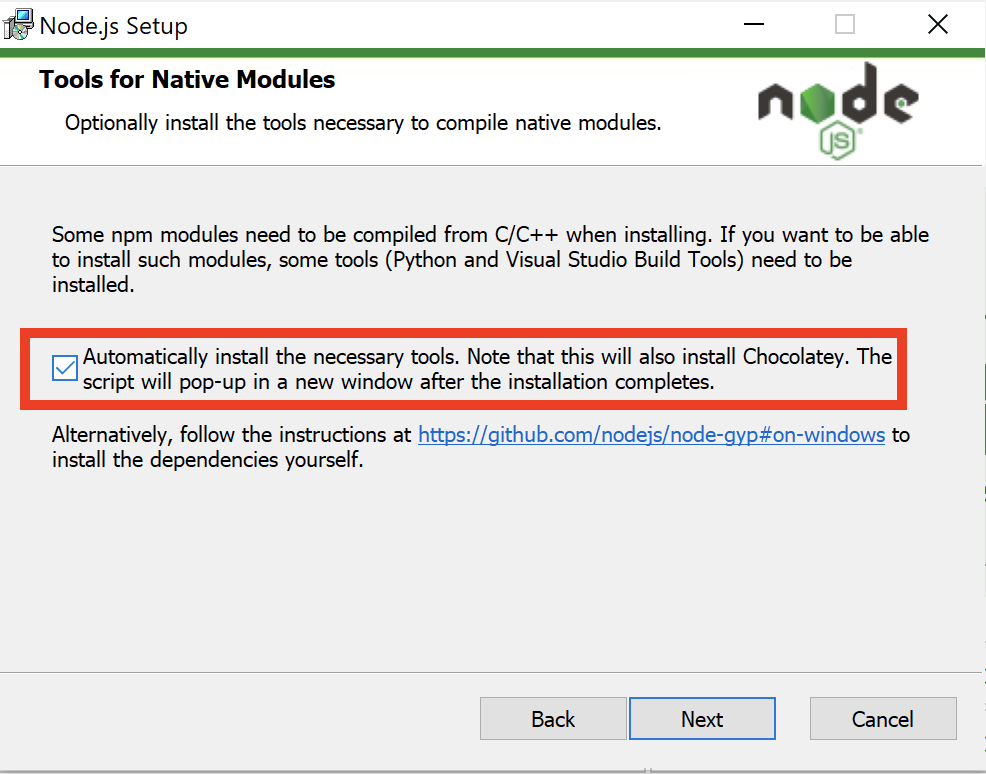
Failed to authenticate with Edge Impulse read ECONNRESET
Failed to authenticate with Edge Impulse read ECONNRESET
If you see this error message and you’re behind a proxy you will need to set your proxy settings via:
SELF_SIGNED_CERT_IN_CHAIN error
SELF_SIGNED_CERT_IN_CHAIN error
If you receive an error as such:It might indicates some restrictions due to your IT policies. Try installing the CLI using the WSL method.WSL provides an isolated environment that can be configured independently of your main Windows setup. In some cases, network and SSL/TLS configurations can be more easily managed or bypassed in a Linux environment.
Tools version "2.0" is unrecognized
Tools version "2.0" is unrecognized
If you receive the following error:
The tools version "2.0" is unrecognized. Available tools versions are "4.0", launch a new command window as administrator and run: